
The Trackman x Zen Integration: A Guide to Adding Real-World Slopes Indoors
Overview
The Trackman × Zen integration helps Trackman owners add real, physical slopes to indoor golf simulator practice, coaching, club fitting, and virtual golf. It connects Trackman performance data with Zen Golf’s moving-floor technology, so players experience slope underfoot while Trackman measures club delivery, ball flight, and shot outcome.
Zen Golf adds movement through Zen Swing Stage and Zen Golf Stage, while Trackman provides trusted launch, club, ball-flight, course-play, and practice data. Together, they help coaches, facility owners, universities, club fitters, and private buyers create indoor environments where the simulated lie, physical ground condition, and performance data align inside the same shot.
This Trackman × Zen Integration Guide compares Zen Swing Stage, Zen Golf Stage, and Zen Green Stage, then explains room requirements, product options, installation routes, common buyer questions, and practical use cases for different types of Trackman owners.
Written by: Will Stubbs, Head of Education, Zen Golf
Last Updated: 06/05/2026
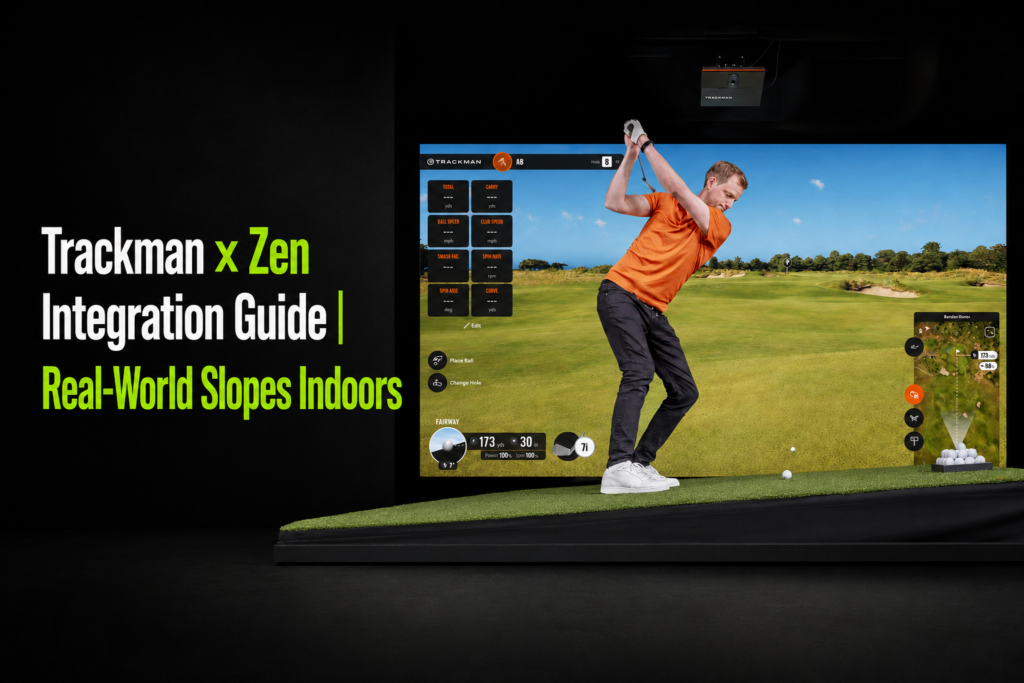
What the Trackman × Zen Integration Is
The Trackman × Zen integration connects Trackman performance data with Zen Golf’s moving-floor technology. This allows coaches and players to interpret launch, impact, and movement data within a sloped practice setting rather than a flat, static surface.
For Trackman setups, Zen Swing Stage and Zen Golf Stage integrate with Trackman Virtual Golf 3 (VG£)as a software layer where simulated course and practice-ground conditions command real-time terrain adjustment on Zen playing surfaces.
Trackman shows what happened to the shot, while Zen changes the ground so the shot is played from a more realistic lie. In Virtual Golf 3, the integration synchronizes course-play data with physical gradient underfoot through Zen Stages.
Owners of Trackman iO, Trackman’s ceiling-mounted indoor launch monitor, will have access to automatic movement for full-swing on Zen Swing Stage and Zen Golf Stage, with putting integration for Zen Golf Stage and Zen Green Stage expected subsequently.
Note: Trackman 4, Trackman’s radar-based launch monitor used indoors and outdoors integrates but is not formally supported.
How the Trackman × Zen Integration Works
- Trackman determines the ball’s lie and slope using simulator course data
- That terrain information is sent to Zen’s active slope platform
- The Zen platform automatically tilts to recreate the same lie as Virtual Golf
- The player hits the shot while Trackman records performance metrics
The visual simulation, physical environment, and performance data are all synchronized to the same shot.
Why Real Slopes Change Trackman Simulator Practice
Trackman metrics such as club path, face angle, face-to-path, attack angle, carry distance, and dispersion already help golfers understand ball flight. Zen’s role is to add the missing context of slope, balance, pressure, and ground interaction.
On flat ground, Trackman data describes execution. On slopes, the same data starts to reveal how a golfer adapts. Club path, face control, attack angle, strike quality, and dispersion patterns change when the golfer stands on uphill, downhill, sidehill, or compound lies.
For golfers, this changes the value of a simulator bay. The bay becomes more representative of on-course conditions, allowing in-depth analysis for course-play decision-making, wedge play, uneven-lie testing, bag-mapping, slope-aware club delivery, and coaching conversations based on what the player does on real-world slopes.
Trackman × Zen Room Requirements
Room planning should start with Trackman’s simulator requirements, then add the footprint and installation route for the chosen Zen Golf product.
Trackman’s simulator technical specifications recommend a room at least 15ft wide x 18ft deep x 11ft high, or approximately 4.5m wide x 5.5m deep x 3.2m high.
Trackman iO is ceiling-mounted and designed for indoor use. Trackman states there are no minimum distance requirements in front of or behind the ball, beyond having enough room to swing a club.
The Trackman x Zen integration requires a 10 ft minimum distance from screen-to-ball for a single-dexterity, off-center bay.
Zen Product Footprints for Trackman Rooms
| Product | Core footprint | Height | Best planning note |
| Zen Swing Stage 1 | 6 × 8 ft | 9 in | Coaching-focused Trackman bays who want embedded force plates |
| Zen Swing Stage 2 | 6 × 8 ft | 7.3 in | Simulator-focused Trackman bays |
| Zen Golf Stage | 12 × 8 ft or 16 × 8 ft | 9 in | Single footprint for putting and full swing |
| Zen Green Stage | 12 × 8 ft, 16 × 8 ft, or 20 × 8 ft | 9 in | Putting-first studios and performance environments |
On-Floor or In-Floor Installation
Zen Swing Stage, Zen Golf Stage and Zen Green Stage all support surface-mounted or recessed installation routes.
On-floor installation suits retrofits, existing simulator bays, and projects where construction depth is limited. For on-floor Zen Swing Stage installations, it is advised to raise the floor between the Stage and the sim screen for improved experience and safety.
In-floor installation suits premium facilities, academies and private studios seeking a flush premium finish.
Which Zen Stage Should Trackman Owners Choose?
| Buyer Need | Recommended Zen Product | Why It Fits |
| Full-swing simulator realism with Trackman Virtual Golf 3 | Zen Swing Stage | Zen Swing Stage is 6 × 8 ft and supports up to 12% uphill/downhill gradient, 10% sidehill gradient, and 0.1% adjustment per corner. It is the most direct fit for full-swing Trackman slope integration. |
| One surface for full swing, wedge play, and putting | Zen Golf Stage | Zen Golf Stage combines putting and full-swing use in 12 ft or 16 ft footprints, supports Trackman integration for full swing. It also allows both tee-to-green practice and putting on the same slope-controlled surface for full-game practice. |
| Putting-first coaching, green reading, and ball-roll work | Zen Green Stage | Zen Green Stage is available in 12, 16, and 20 ft lengths, supports 6.5% up/down and 9% left/right movement, and integrates with putting technologies such as Science & Motion and Quintic. Trackman putting integration is expected subsequently. |
| Existing Trackman facility seeking staged upgrades | Zen Swing Stage first or Zen Golf Stage subsequently | Trackman automatic movement for Zen Swing Stage with Trackman iO. With Zen Golf Stage putting integration expected subsequently. |
| Private simulator owner seeking maximum use from one room | Zen Golf Stage | Zen Golf Stage supports full swing and putting in one footprint, with app control, presets, custom sessions, and Trackman iO integration expected subsequently. |
Trackman × Zen Installation Routes
Route 1: New Trackman Build with Zen Movement Included
This route suits new facilities, universities, performance centers, and private homes where the room is still being designed.
Start with Trackman room dimensions, then specify the Zen surface, ceiling height, screen-to-ball distance, floor build-up, safety margins, electrical planning, and user flow.
This route is usually strongest when the buyer wants a clean architectural finish, a premium player experience, and future software integration from the start.
Route 2: Existing Trackman Bay Retrofit
This route suits owners who already operate Trackman indoors. The buyer should verify the available floor area, ceiling height, screen distance, player swing space, and whether the Zen product is best installed on-floor or recessed.
Route 3: Coaching Studio Upgrade
This route suits coaches who want more representative learning conditions, not simply more simulator play. Adding Zen slopes to your coaching environment enhances your product offering through enhanced Trackman metrics, and player decision-making.
A coaching studio should specify how slope sessions will be programmed, measured, and repeated. Useful session types include uneven-lie assessments, wedge distance calibration, face-to-path stability on sidehill lies, and pressure games using Trackman Performance Studio (TPS).
Route 4: Commercial Multi-Bay or University Facility
This route suits indoor centers, academies, and universities. Zen’s Golf Stage and Swing Stage bays for coaching and entertainment, franchise-ready configurations, scale-up planning, multi-unit purchasing, and upgrades to current simulator environments.
For universities, Zen Stages are part of performance-first environments supported by integrations with Trackman, Science & Motion, Quintic, Zen Eye, and Swing Catalyst, with modular configurations and upgrade pathways.
Trackman × Zen Use Cases by Buyer Type
Coaches
Trackman × Zen supports coaching sessions where the coach designs the environment, then uses data to guide reflection.
Practical applications include slope-tendency profiling, sidehill face-control testing, uphill and downhill low-point work, wedge-distance calibration, and playing lessons indoors.
This shifts the coach’s role toward designing learning environments through slope, targets, and task constraints.
Facility Owners and Indoor Centers
For commercial operators, the value is stronger differentiation and more reasons for repeat use.
Programs might include slope leagues, wedge-control sessions, uneven-lie combines, corporate events, member challenges, junior development, and premium coaching packages.
Zen’s Golf Stage and Swing Stage bays, scale-up planning, current sim upgrades, and multi-unit purchasing options provide long-term ROI and reduce membership churn.
Explore indoor center use cases
Universities and Colleges
University programs often need shared-use environments for player development, recruitment, team practice, research, and donor-supported facility upgrades.
Adding Zen Stages have been core to NCAA Div 1 winning terms over the past 6 years. They are a key part of performance-first environments with modular configurations, tech-stack integration, and options to suit men’s and women’s team sharing layouts.
Explore university and academy use cases
Club Fitters
Trackman × Zen supports club fitting sessions where the fitter optimizes equipment on flat ground, then validates performance under real slope conditions.
This gives fitters a stronger basis for recommendation. A club that produces strong numbers on a flat mat still needs to function when effective loft, strike location, launch, spin, and balance strategy change on slope. Zen’s Map My Bag on Slopes article shows how slope-aware testing builds a more useful distance matrix, including neutral carry, uphill carry, downhill carry, and sidehill tendencies.
For premium fitting studios, the commercial value sits in trust, differentiation, and post-fit confidence. The fitter can move from single-club optimization to full-bag validation, using the final part of a session to test new clubs in simulated on-course conditions before the player leaves the bay.
Private Trackman Buyers
Private buyers prioritize realism, usability, space planning, and long-term enjoyment. Zen’s Stages provide home user quiet operation, safety certification, intuitive presets, and integration-led course experience for maximized immersion.
A private Trackman owner should choose Zen Swing Stage for focused full-swing simulator play. The Zen Golf Stage offers the full-game experience when one room needs to support putting, wedge play, and full swing.
Trackman × Zen Buyer Checklist
- Confirm your Trackman system: Trackman iO or Trackman 4.
- Confirm the core use case: Coaching, commercial simulator play, university performance, private use, putting, full swing, or mixed use
- Measure the room: Width, ceiling height, depth, screen-to-ball distance, door access, flooring, lighting, and player swing comfort
- Select the Zen product: Zen Swing Stage 1 (force plates accessible), Zen Swing Stage 2 (designed for sim golf), or Zen Golf Stage (multipurpose putting and full-swing spaces).
- Decide on installation route: On-floor retrofit or recessed in-floor finish
- Review support route: Installer access, warranty, remote diagnostics, software subscriptions, and aftercare
- Prepare your project information: Room drawings, photos, Trackman model, project timeline, budget range, and intended users
- Speak with Zen about the correct product, integration status, and installation pathway for the specific room
Key Takeaways
The Trackman × Zen integration gives indoor golf a physical slope layer. Trackman measures ball flight, club delivery, shot outcome, and simulator course context. Zen Swing Stage and Zen Golf Stage recreate the ground conditions under the player’s feet, so the shot is played from a more representative lie.
For Trackman owners, the main value is context. A flat mat shows how a golfer performs in neutral conditions. The Zen Stage shows how the same player adapts when slope, balance, launch, strike, and decision-making change together.
Zen Swing Stage is the clearest option for full-swing simulator realism. It is built around fairway, wedge, and full-shot practice, with up to 12% uphill/downhill gradient and up to 10% sidehill gradient.
Zen Golf Stage is the strongest option when one room needs to support putting and full-swing practice. It combines Zen Master Turf and hitting turf in one slope-controlled footprint, with up to 6.5% uphill/downhill movement and up to 9% sidehill movement.
Room planning should begin with the Trackman setup, then add the chosen Zen product footprint, installation height, floor build-up, safety margins, screen-to-ball distance, and player movement around the bay.
The best product choice depends on the use case. Coaches usually prioritize player adaptation and learning transfer. Facility owners prioritize differentiated experiences and repeat-use programming. Universities prioritize shared performance environments. Club fitters prioritize validation beyond flat-ground numbers. Private buyers prioritize realism, usability, and long-term enjoyment.
The next step is to confirm the Trackman model, room dimensions, primary use case, preferred Zen Stage, and installation route before designing the final space.
Explore What the Trackman x Zen Integration Could Mean for You
For Players
Train in environments that reflect real golf and build confidence that transfers to the course.
For Coaches
Understand how players think, adapt, and perform under realistic constraints.
For Indoor Facilities
Deliver a premium experience that connects entertainment with performance.
For Universities and Colleges
Prepare players for competition through representative practice environments.
Explore the Trackman x Zen Integration Overview.
Explore Zen Swing Stage, Zen Green Stage, and Zen Golf Stage.
Book a call to discuss how the next evolution of sim golf could support your players, program, or facility.
